~ $ cat work/warriors-path.md
Warrior’s Path
A terminal RPG with combat, loot, bosses, and save files.
Systems · 2026Built on my own.
- OUTCOME
- Saves and loads your game, checked by automated tests
- SCOPE
- Solo project
Built with
- Python
- Object-oriented design
- pytest
- JSON
What it is
Warrior’s Path is a fighting game you play in the terminal, a text-only window. You choose actions from a menu, fight enemies and bosses, collect loot, level up, and save your game to continue later.
Games are a good way to practise keeping many things in step: health, items, levels, and saves all have to agree with each other.
What it can do
Turn-based fights
You and the enemy take turns. Each hit does your attack minus their defence, and never less than zero.
Three bosses
A White Tiger, a Shadow Dragon, and an Ancient Golem. Which one you meet depends on your level.
Angry bosses
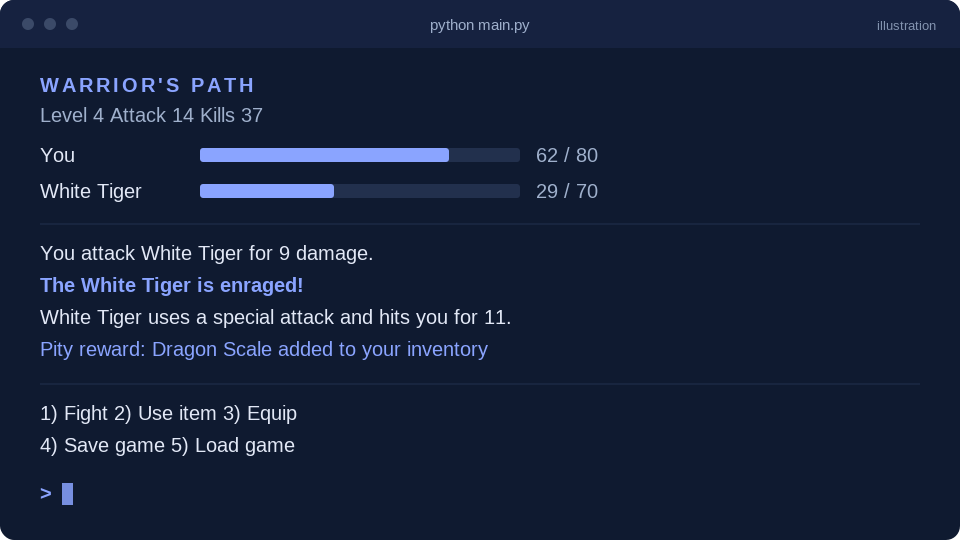
At half health a boss becomes enraged, and has a 30% chance of using a special attack.
Loot with odds
Common items drop often and rare ones very rarely, such as the Dragon Scale.
Bad luck protection
After 100 kills you get a guaranteed rare item, and after 10 boss fights a guaranteed boss reward.
Levels and saving
You can reach level 25. Each win makes you stronger, and your progress is saved to a file you can load later.
How a request flows
- Menu loopTerminal input
- BattleTurn-based rules
- Player stateInventory, pity counters
- JSON fileSave and load
How it works
- 01
A menu shows your health, level, and attack, and lets you fight, use items, equip gear, save, or load.
- 02
In a fight, you and the enemy take turns until one of you runs out of health.
- 03
If you win, you earn experience, a chance at loot, and stronger stats.
- 04
Hidden counters keep track of your kills and boss fights, ready to give a guaranteed reward when they reach the limit.
- 05
Saving writes everything about your character to a file. Loading reads it back.
Illustration
Why
Games are a compact way to practise state: health, inventory, levels, and saves all have to stay consistent.
What I built
- 01
Separated combat, progression, inventory, and terminal output into their own classes and functions.
- 02
Built turn-based combat, boss encounters with a pity counter, weighted loot, and player progression.
- 03
Added JSON save and load for player state, with pytest tests.
The code
    def check_rare_pity(self):
        if self.rare_pity >= 100:  # 100 kills required
            reward = random.choice(self.rare_items)
            self.inventory.append(reward)
            self.rare_pity = 0  # resets pity back to 0
            print(Fore.MAGENTA + Style.BRIGHT + f"  ✦ Pity reward: {reward['name']} ✦")

    def check_boss_pity(self):
        if self.boss_pity >= 10:  # 10 boss skills required
            reward = random.choice(self.boss_items)
            self.inventory.append(reward)
            self.boss_pity = 0  # resets pity back to 0
            print(
                Fore.MAGENTA
                + Style.BRIGHT
                + f"  ✦ Boss pity reward: {reward['name']} ✦"
)See it run
==========================================
          ⚔   WARRIOR'S PATH   ⚔
==========================================
  Name:    Hero
  Level:   0    XP: 0
  HP:      [**********----------] 100/200
  ATK:     15    DEF: 5
------------------------------------------
  [1]  Fight      [2]  Inventory (0 items)
  [3]  Equip      [4]  Use Item
  [5]  Exit       [6]  Save     [7]  Load
==========================================
  Choose: 1
==========================================
  Battle: Hero vs Enemy
==========================================
  You deal 10 damage.   Enemy HP: 90
  Enemy deals 10 damage.  Your HP: 190
  ...
  You deal 10 damage.   Enemy HP: 0
  Stats upgraded! ATK: 25 | DEF: 10
  Level: 0 | XP: 50
  Loot: Rusty Dagger
  *** Victory! Survived 10 rounds. ***
  Choose: 6
Saving Players data...
Writing File...
Player data saved sucessfully.

$ cat playerSave.json
{"KeyXP": 50, "KeyInv": [{"name": "Rusty Dagger", "type": "weapon"}],
"KeyLvl": 0, "KeyHp": 110, "KeyMaxHp": 200, "KeyAtk": 25, "KeyDef": 10, ...}Outcome
A playable game whose progress survives between sessions. The session on this page was recorded from the real program.
The trade-off
Saves are plain JSON rather than pickle. JSON is readable and safe to load, but every field has to be mapped by hand in both directions.
What I learned
Keeping game rules separate from printing made the rules testable without running the game.
What I'd fix next
The save menu prints “saved successfully” before the file is written, so a failed write still reports success. I’d move the message after the write and add a test for a failed save.